Git Configuration
Overview
Configurations enable cloning of private repositories, disabling of SSL verification, and/or extending verification through a custom bundle of certificates.
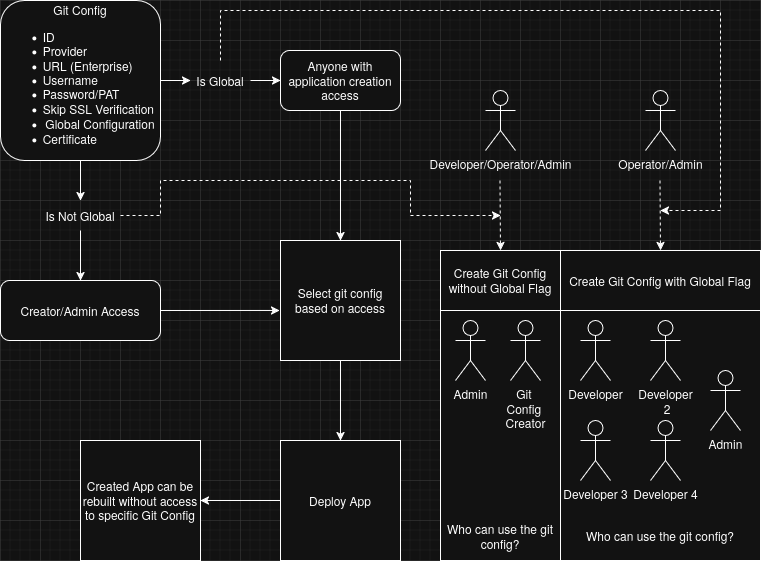
For GitHub and GitLab instances you create a git configuration with a username and password/token, and optionally the skip-SSL-verification and global flags. A global configuration can be used by any user; a non-global one is visible and usable only to the user who created it and to administrators. Only administrators may create a global configuration.
For the git, GitHub Enterprise (Cloud and Self-Hosted), and GitLab Enterprise types the same
fields are available plus a git host field, where you enter the instance URL.
You attach a configuration to an application by selecting it when you set the application's Git source. Epinio does not implicitly match a configuration to a repository URL; the selection is explicit, and a private repository will fail to clone if no usable configuration is selected.
Github/Gitlab Specialities
The public Github and Gitlab repositories support the use of a PAT (Personal Access Token)
over a plain combination of user and password.
When using a PAT it has to be set as the password, and the user can be set to anything except empty.
For reference, it is useful to set it to the username used to generate the token.
Enterprise and self-hosted instances
The enterprise and generic git types take a git host URL in addition to the credential
fields:
- GitHub Enterprise Self-Hosted (
github_enterprise_self_hosted): enter the instance host URL (for examplehttps://github.mycorp.com). Epinio appends the GitHub Enterprise Server REST path (/api/v3). - GitHub Enterprise Cloud (
github_enterprise_cloud): enter the API host URL for your Enterprise Cloud instance, for examplehttps://api.github.com, orhttps://api.<subdomain>.ghe.comfor a data-residency instance. Epinio uses it as given. - GitLab Enterprise (
gitlab_enterprise) and generic Git (git): enter the instance host URL. GitLab is accessed under/api/v4.
Detailed Specification
A Git configuration is a Kubernetes secret with the epinio.io/api-git-credentials: "true" label.
The fields are:
| Field | Required | Meaning |
|---|---|---|
id | yes | the name of the secret |
url | the host of the git instance | |
provider | yes | one of github, gitlab, git, github_enterprise_cloud, github_enterprise_self_hosted, gitlab_enterprise |
username | used during the Basic Authentication | |
password | used during the Basic Authentication | |
skipSSL | used to skip the SSL verification | |
global | used to make the configuration available to all users | |
certificate | the CA bundle to load for the SSL verification with self-signed certificates |
Notes:
urlis optional for the SaaSgithubandgitlabproviders (the host is implied). It is required forgit,github_enterprise_cloud,github_enterprise_self_hosted, andgitlab_enterprise.globalmay only be set by an administrator.passwordandcertificateare write-only: they are never returned when a configuration is read. There is no update endpoint, editing a configuration means deleting and recreating it, so the password and certificate must be provided again each time.
Git Configuration Flow
For more examples check the How-to.